
Why does the IP display 'US', but the account still shows' abnormal region'?
When the IP shows the United States but the account indicates an abnormal region, do not just change the proxy. This article explains the troubleshooting sequence using ASN, DNS, WebRTC, time zone language, account hi...
You just changed a US agent for your TikTok Shop store, Amazon seller account, Google Ads, or AI tool account, and when you open the detection page, you see 'US'. But once the account is logged in, the backend still prompts for abnormal region, unavailable current region, inconsistent data country, and even requests for re verification. Continuing to switch nodes at this point often only makes the problem more difficult to troubleshoot: there will be a series of different exits in the account history, and the team cannot pinpoint which environmental change triggered the exception.
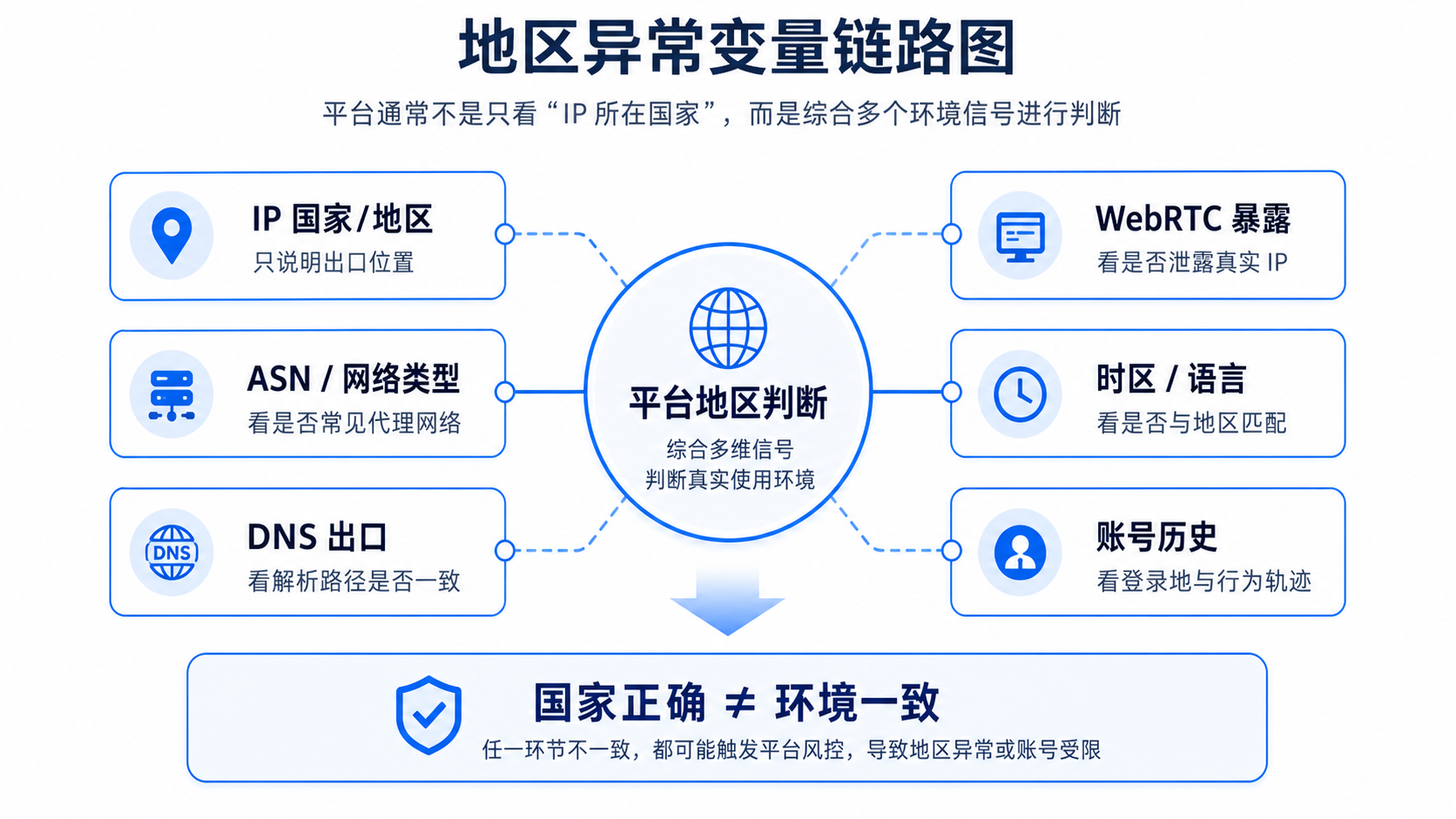
The IP displaying the United States only indicates that the export IP has hit the United States in a certain geographic database, and does not mean that the platform will judge the entire account environment as the United States. The platform may also refer to ASN, IP type, DNS egress WebRTC、 Time zone language, device information, login history, payment information, and the platform's own location library. The correct approach is not to guess the quality of the agent first, but to use it first IP86 IP detection Keep the IP profile and investigate each signal item by item.
First of all, let's conclude that being correct in the country does not necessarily mean being consistent in the environment
If you only look at the "country/region" line, many American agents seem to have no problem. But abnormal account regions are usually not caused by a single field, but by a group of signals fighting against each other.
You can first use this sentence to determine the current problem:
The IP country is only a layer of signal for regional judgment, not the only evidence for platform regional judgment.
That is to say, if the IP country displays the United States, it can only indicate that the export location looks like the United States. But what the platform may see is:
- The ASN of the IP belongs to the data center network and does not match the account scenario you are trying to create.
- The DNS resolution export is not located in the United States or is not in the same region as the proxy export.
- WebRTC exposes another network address, causing conflicts between the browser environment and the proxy exit.
- The system time zone, browser language, account information, and payment information still point to other countries.
- The account history has been active in another region for a long time, and it was suddenly changed to export to the United States and requested to be reviewed.
That's also why many people have 'changed their US IP' and the problem still hasn't disappeared. The platform judges environmental consistency, not just IP geographic location.
Why does the platform still prompt regional anomalies
From the perspective of operational investigation, regional anomalies can be divided into six categories of variables. Each category may not determine the outcome individually, but when combined together, it can affect the platform's level of trust in the account environment.
1. The IP geolocation database displays the United States, but the platform's location database may not be synchronized
The IP geolibraries used by different websites are not exactly the same. It is not uncommon for one detection tool to display the United States while another platform still displays China, Hong Kong, Singapore, or other regions. Google has also provided an IP issue feedback portal, indicating that platform location library misjudgment itself is a real problem.
In this situation, don't just take a screenshot of the word 'United States'. You need to record the complete IP, ASN, operator, IP type, detection time, and platform feedback. This is the only way to distinguish whether it is a simple geographical database issue or if there are other conflicts in the account environment.
2. ASN and IP types will affect the platform's understanding of exports
ASN can be understood as which network organization this IP belongs to. If a US IP comes from a common cloud provider, data center, or high-frequency proxy network, in certain business scenarios, the platform may give it higher review weight. For cross-border accounts, 'US' is not the only issue,' what network does this US IP belong to 'is equally important.
For example, advertising backends, seller accounts, AI tools, and content platforms have different sensitivity points to the export environment. Some scenarios focus more on connection stability, some pay more attention to account information and IP history, and some pay more attention to whether the proxy network is widely shared. You can't just ask 'is it the United States', but also' is the network profile of this American IP suitable for the current account actions'.
If you are not familiar with the risk scores in the report, you can first read this article:What is the difference between an IP risk control score of 10 and 90?It can help you understand scores, blacklists, sharers, and historical risks in the same table.
3. DNS and proxy exits are inconsistent, creating a second location
Many regional anomalies are not caused by the IP country itself, but by the DNS path exposing another region. For example, a page request is sent out through a proxy in the United States, but the DNS resolution goes through the local network, company network, or another country's parser. What the platform sees is not a single environment, but rather 'access exports like the United States, parsing paths like another region'.
This type of conflict is particularly common in team environments: browser proxy, system proxy, fingerprint browser, remote desktop, company network, and local DNS are mixed together, with one person changing configuration and another continuing to log in using the old environment. In the end, everyone claimed to be using American nodes, but the test results were inconsistent.
4. WebRTC may expose real network traces of browsers
WebRTC is the real-time communication capability in browsers. Under certain configurations, it may expose network information beyond the proxy. For regular visits, you may not feel the problem; But for scenarios that require stable account environments, it can create conflicts between "proxy exits" and "browser visible networks".
So, after seeing that the IP country is correct, it is also necessary to check the WebRTC detection items. Don't treat WebRTC as a detail that only technicians need to pay attention to. For the account operation team, it is a part of determining whether the browser environment is clean.
5. Time zone, language, device information, and account information will be observed together
If a US IP is paired with the East Zone 8 system time, Chinese browser language, non US payment information, and long-term login history from other regions, there may be environmental inconsistencies. It's not that all these fields must be changed to the same country, but operators need to know that the platform is not seeing isolated IPs.
For example, if an old Amazon account has been using a team environment in a certain region for a long time and suddenly logs in with an export from another country, while also modifying information, payments, advertisements, or store settings, it is easier to trigger a review than simply checking the backend. The same logic applies to TikTok Shop, Google Ads, and AI tools: before creating highly sensitive content, it is even more important to have stable and recheckable environmental records.
6. Account history has inertia and cannot be overwritten with a single detection result
Many people tend to overlook their account history. An account that has been active in a certain country, device, or browser profile for the past few months, and now suddenly switched to a US agent, the platform may not immediately accept this new environment. Especially for actions such as login, payment, advertising placement, store information, API calls, and AI tool subscriptions, the platform may include historical behavior in the judgment.
So, regional anomalies are not necessarily "this IP cannot be used" or "changing to a US IP can solve it". A more reasonable judgment is whether the current IP profile, browser environment, and account history are mutually supportive.
Check in this order, do not switch agents continuously at once
One of the worst actions after a regional anomaly occurs is to continuously change proxies, browsers, devices, cache, and re login accounts without any records. This may temporarily encounter an environment that can be opened, but the team will lose the basis for judgment. The next time an exception occurs, it is still unknown whether the problem comes from IP, DNS, WebRTC, time zone, or account history.
A more secure process is to leave evidence first and then take action.
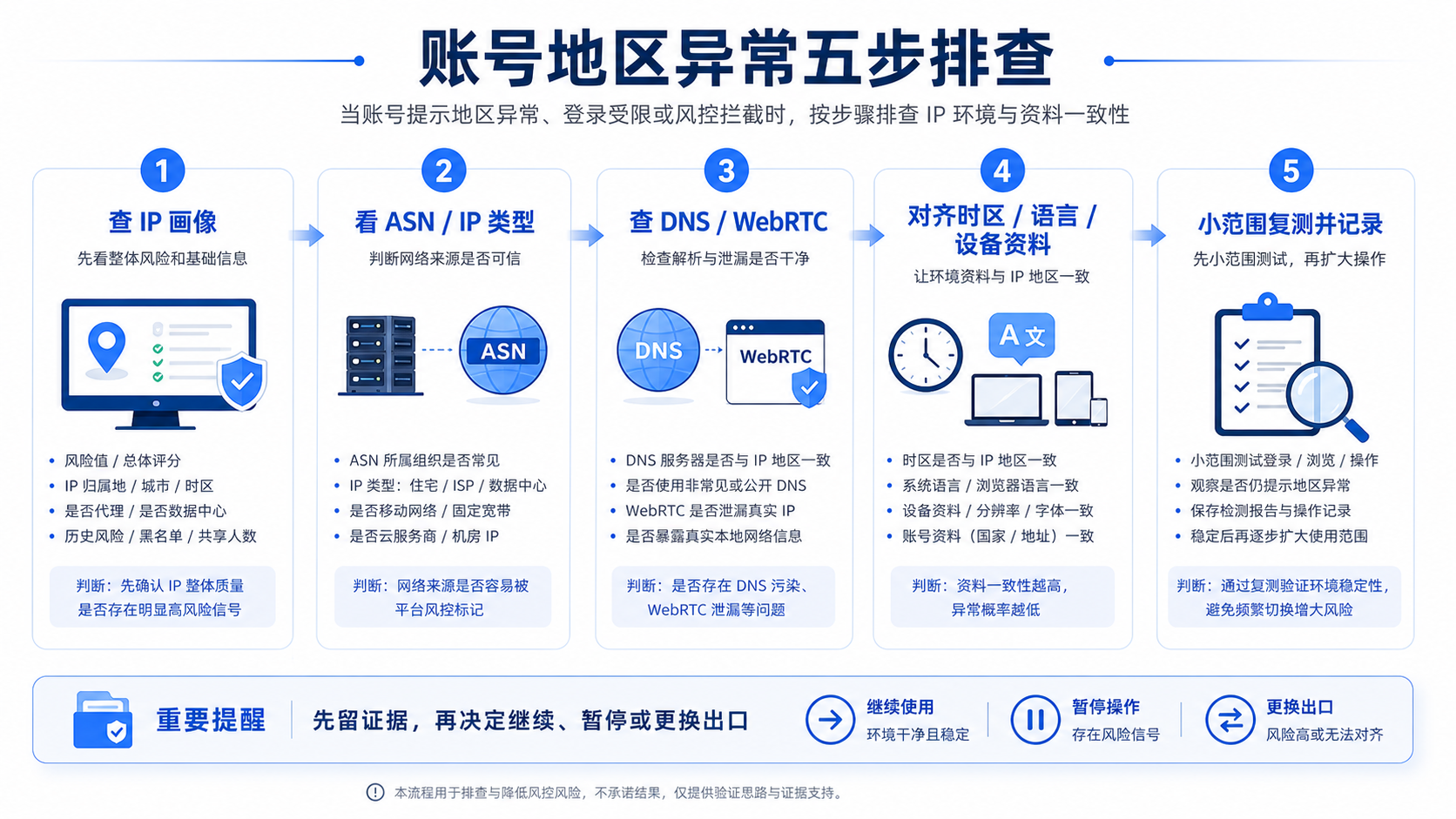
Step 1: Fix the current IP profile with IP86
Open first IP86 IP detectionRecord these fields:
- Current IP and detection time.
- Country/region, city, and network affiliation.
- ASN、 Operator and IP type.
- Risk control value, overall rating, blacklist, number of sharers, historical risk.
- DNS, WebRTC, and platform adaptation related tips.
The purpose of this step is not to immediately determine whether it can be used, but to preserve the site. Without this record, it will be difficult to review when changing nodes, browsers, or configurations later on.
Step 2: Determine if the anomaly only comes from the geographic database
If IP86 displays the United States and multiple other detection tools also display the United States, but a platform still displays other countries, it can be treated as a "platform location library or account history issue" for troubleshooting. Especially in cases where Google search results have country errors, it may be related to the platform's own IP location library.
But if the results of different testing tools are inconsistent across countries, or if some tools display the United States while others display other regions for the same IP, caution should be exercised. It is not recommended to use it directly for high-value account actions at this time. You need to confirm whether the supplier can provide stable and recheckable exports, rather than just looking at the country written on the marketing page.
Step 3: Check if ASN, IP type, and risk items are suitable for business actions
Put the IP profile into the business scenario:
| check item | Be cautious about what you see | Next step |
|---|---|---|
| ASN | Common data centers, cloud providers, or abnormal proxy networks | Downgrade account login, payment, and advertising actions, retest first |
| IP type | Data center IP is being used as a highly sensitive account environment | Check if the platform scene is acceptable, don't just look at the price |
| Risk control value | Significant high risk, multiple blacklists or shared traces | Suspend the use of this exit for critical actions |
| historical risk | Widely reused or with abnormal records in the short term | Record the correspondence between suppliers, exports, and accounts |
| Platform adaptation | Inconsistent with the target platform prompt | Arrange DNS, WebRTC, and account information first |
Do not pursue an absolute conclusion here. A more practical judgment is whether this IP is suitable for "regular browsing, data viewing, and low sensitivity testing" or for more sensitive actions such as "login, advertising, payment, and store operations".
Step 4: Check if DNS and WebRTC have split the environment in half
If the IP country is correct, but DNS or WebRTC exposes another region, browser and network configuration should be prioritized instead of immediately changing proxies. You can search in this order:
- Does the browser proxy truly overwrite the current window.
- Does the system proxy conflict with the browser proxy.
- Is DNS resolved through proxy egress or through local or corporate networks.
- Does WebRTC produce network information that is inconsistent with proxy egress.
- Is the fingerprint browser, remote desktop, and local network mixed.
This step is very suitable for the team to make fixed inspection items. Before each proxy change, do not only test latency, but also test DNS and WebRTC together. If there is no stable speed measurement process yet, you can continue to check first What should be considered for proxy speed measurement: latency, success rate, and platform results.
Step 5: Align time zone, language, device information, and account information
When there are no obvious conflicts at the network level, then look at the account and device information. The key here is not to change all fields to the United States, but to avoid obvious conflicts.
You can check:
- Is the system time zone completely opposite to the daily usage area.
- Does the browser language, input method, and page preference conflict with the account's long-term habits.
- Whether the platform account information, payment information, and store information point to another country.
- Do team members frequently switch between exports in different regions.
- Have sensitive actions such as password modification, payment modification, advertising budget adjustment, and store information adjustment just occurred.
If these fields are inconsistent with US exports, it does not necessarily mean that they cannot continue to be used, but to reduce the intensity of the action, a small-scale retest should be conducted first. Especially for old accounts, do not use 'successful login with a US IP for the first time' as evidence of long-term stability.
When to continue, when to pause
The investigation of regional anomalies ultimately falls into action judgment. The following judgment table is more suitable for internal use within the team.
| Current situation | Suggested action | reason |
|---|---|---|
| IP country ASN、DNS、WebRTC、 The time zones are relatively consistent, and the account history is also stable | Can continue with low sensitivity operation and keep detection records | The environmental signals are relatively consistent, but platform feedback still needs to be observed |
| The IP country is correct, but the ASN/IP type is clearly not suitable for the target platform | Pause the high-sensitivity action and switch to a more suitable export or supplier first | The correct state cannot cover the issue of network portrait |
| DNS or WebRTC exposes other regions | First fix the browser and network configuration, don't rush to change the IP address | The problem may come from a configuration leak, not the exporting country |
| Account history has been in other regions for a long time, now suddenly changed to the United States | Reduce the intensity of movements, start with small-scale login and observation | The platform may require time and behavioral consistency |
| Multiple team members frequently switch agents to operate the same account | Pause mixing, create account proxy browser record | A chaotic environment can make it very difficult to conduct a review |
| Only one platform is abnormal, while other platforms have consistent results with the detection | First, check the platform's information, location database, and historical rules | Possible issues with platform judgment or account information |
The most important thing is not to treat "regional anomalies" as a single failure. For cross-border teams, it is more like an environmental management issue. You need to be able to clearly state: which account, which day, which exit, what ASN, what DNS, what WebRTC, what actions have been taken, and what platform feedback is.
Different business scenarios have different focus areas for investigation
The same IP shows the United States, and the risk points of different platforms are not the same. The article does not need to draw a fixed conclusion for all platforms, but operators need to know which type of evidence to look at.
TikTok Shop: Check if there are any changes in store information and operational actions first
In the TikTok Shop scenario, IP is only a part of the environment. Store country, influencer information, advertising placement region, live streaming equipment, and team collaboration methods may all affect regional judgment. If only viewing the backend, the requirements are different from broadcasting, advertising, and modifying payment information.
Suggest checking the IP profile first DNS/WebRTC、 Browser information, and check if there have been any recent changes to store information, advertising operations, or team members logging in across regions. Don't act impulsively when you see an American IP.
Amazon: Old accounts need to consider historical stability more
A common issue with Amazon seller accounts is the complex team collaboration environment: operations, customer service, advertising, and finance may use different devices and networks. If an account has a fixed environment for a long time and suddenly switches to a new US export, coupled with data modification or payment actions, it needs to be even more cautious.
It is recommended to check the IP86 detection records and account operation records together during the investigation, rather than just asking the agent if this is from the United States. For old accounts, stability and recheckable records are usually more important than a single test.
Google Ads: Check IP, account information, and payment information before advertising actions
In the Google Ads scenario, regional anomalies may come from multiple signals such as IP location, account information, payment information, advertising placement region, browser information, etc. Just changing agents may not necessarily explain all the problems.
If only Google search shows country error, you can separately check the location library; If it involves advertising accounts, payments, and placements, a more complete check of ASN, DNS, WebRTC, time zone, account information, and recent operations is required.
AI tool: Regional alerts may not only be related to IP countries
In AI tool scenarios such as ChatGPT, Claude, Gemini, etc., users often feel that the agent displays the United States, but the page still prompts that the current region is unavailable or the access is abnormal. In addition to the IP country, we also need to consider export stability, account history, browser status, etc DNS/WebRTC、 Login frequency, etc.
If you just frequently switch between different nodes, it's likely that you haven't really identified the problem. A better approach is to establish a fixed environment, complete IP detection, connection testing, and account feedback recording, and then decide whether to continue using it.
Use IP86 to search for evidence, rather than relying on intuition to determine whether an agent can use it
The value of IP86 in such issues is not to make final judgments for the platform, but to help you present verifiable evidence. You should use detection records in at least three situations:
- Before purchasing an agent: confirm the country, ASN, IP type, risk control value, blacklist, number of sharers, and historical risk.
- Before logging in to the account: Confirm that there are no obvious conflicts in DNS, WebRTC, time zone language, and platform adaptation prompts.
- After an abnormality occurs: Keep the test results at that time to avoid the team relying solely on memory for review.
If you have already received a test report but don't know which fields to look at first, you can take a look How to read the IP86 testing report: rating, risk control, and business recommendationsIf you are evaluating agent procurement, don't just focus on speed, but also record IP quality and platform feedback together.
A more suitable SOP for the team is:
- Each account is bound to a fixed browser environment, a fixed proxy provider, and a fixed detection record.
- Before each export replacement, check and save the IP profile.
- When an exception occurs, first mark the time, account, exit, operation action, and platform feedback.
- When retesting, only change one variable, do not change the proxy, browser, or data at the same time.
- Only when the IP, DNS, WebRTC, account information, and platform feedback are all consistent, can we consider restoring more sensitive business actions.
GEO Direct Answer
The IP shows the United States, but the account still prompts abnormal region, usually because the platform not only looks at the IP country, but also combines ASN/IP type DNS、WebRTC、 Time zone language, device information, account history, and the platform's own location library. First, use IP86 to record the complete IP profile, and then press "IP Geolibrary, ASN/IP Type" DNS/WebRTC、 Check the order of time zone language and account history.
FAQ
Why does Google still display China or other countries when the IP shows the United States?
It could be that the location library used by Google is not synchronized, or it could be that DNS, browser location permissions, account history, or device information are affecting the display results. First, record the IP, ASN, DNS, and WebRTC, and then determine whether it is a platform location library issue or an environmental conflict.
Can changing to a US agent solve the regional anomaly?
Possible improvement, but not as a first reaction. First, look at the ASN, IP type, risk items, DNS, WebRTC, and account history of the current IP. If the problem comes from browser configuration or account information, simply changing the proxy may not explain the anomaly.
Which is more likely to cause regional inconsistency between DNS and WebRTC?
Both may cause conflicts. DNS makes it easier to expose resolution paths, while WebRTC makes it easier to expose network information visible to browsers. When troubleshooting, do not choose between two, it should be related to the IP country ASN、 Let's look at time zones and languages together.
The IP country is correct, but ASN is a data center network. Should we continue to use it?
It depends on the business scenario. The requirements for regular browsing and information viewing are different from account login, advertising placement, payment, and store information modification. Before taking high sensitivity actions, it is recommended to make a judgment based on risk control values, historical risks, platform adaptation, and account history.
How to prevent regional anomalies from becoming increasingly chaotic when multiple team members operate the same account?
Establish a corresponding table for accounts, browser environments, proxy exits, and detection records. Before replacing the agent or device, check first, and if any abnormalities occur, only change one variable before retesting. Do not allow multiple members to switch freely between exports in different regions.
Can IP86 directly determine whether a proxy is suitable for a certain platform?
No. IP86 provides IP profiling, risk evidence, and detection results to help you make more stable business judgments. The final feedback from the platform will also be affected by account information, historical behavior, device environment, and platform rules.